Sign In | Join Free | My rc363.com
China Shenzhen Xinxiantong Technology Co., Ltd. logo
Shenzhen Xinxiantong Technology Co., Ltd.
我们致力于通过持续为全球客户提供创新的产品、可靠的质量和长期的合作价值,成为显示技术领域值得信赖的全球合作伙伴。
Verified Supplier

1 Years

Home > HDMI LCD Display >

3.5 Inch HDMI LCD Display 480x320 Resolution TFT Resistive Touch Screen

Shenzhen Xinxiantong Technology Co., Ltd.
Trust Seal
Verified Supplier
Credit Check
Supplier Assessment
Contact Now

3.5 Inch HDMI LCD Display 480x320 Resolution TFT Resistive Touch Screen

  • 1
  • 2

Outline : 118.5×84.7×5.2 mm

Delivery Time : 30-45days

Signal Interface : LVDS

Lumens Degrees : 1000cd/m²

Interface : RGB, SPI, MIPI, LVDS, or Parallel

Model Number : YQ43-35

Display Mode : Normally White, Transmissive

View Direction : free/all

Payment Terms : T/T

Controller Ic : SSD1316

Storage Temperature : -30℃~80℃

Lcm Dimension : 34.60(H) X 47.80(V) X 1.90(T)

Response Time : 6ms

Display Color : Monochrome Black and White

Price : $12.5-14.2/pieces

Operating_Temperature : -20°C to 70°C

MOQ : 100

Color Gamut : 72 % of NTSC(Typ.)

Supply Ability : 50K/Month

Drive System : a-Si TFT active matrix

Place of Origin : Guangdong, China

Brand Name : XXT

Packaging Details : 85.51x60.60 (mm)/ 135(g)

Name : HDMI LCD Display

Viewing Area : 116.2mm×87.1mm

Contact Now

3.5 Inch TFT Resistive Touch Screen 480×320 Resolution LCD Display Module
Detail Information
Place of Origin
China
Brand Name
xXT
Certification
CE/Rohs
Model Number
YQ43-35
Type:
TFT Resistive Touch Screen
Display Size:
3.5 Inch
Supplier Type:
Factory
Video Input:
HDMI
Highlight:

3.5 Inch TFT LCD Display

,

3.5 Inch TFT Resistive Touch Screen

,

480×320 Resolution LCD Display Module

Product Description
3.5 Inch TFT ResistiveTouch Screen 480×320 Resolution LCD Display Module Compatible with Raspberry Pi 1, 2 & 3
Product Description
3.5" IPS TFT display with resistive touch screen, specifically designed for Raspberry Pi compatibility while offering versatile connectivity options.
  • 3.5" standard display with 480 × 320 resolution
  • 4-wire resistive touch screen for precise control
  • Adjustable backlight with power-saving mode
  • Standard HDMI interface input for universal compatibility
  • Direct plug-and-play with Raspberry Pi (3rd, 2nd, and 1st generation)
  • Functions as general-purpose HDMI monitor for computers (requires 480×320 resolution output)
  • Supports multiple operating systems: Raspbian, Ubuntu, Kodi, Win10 IOT (with touch support)
  • PC monitor capability for XP, Win7, Win8, Win10 systems (touch not supported)
  • CE and RoHS certified for quality assurance
Product Specifications
Parameter Value
Size 3.5 inch
SKU MPI3508
Resolution 480×320 pixels
Touch Technology 4-wire resistive
Dimensions 85.51×60.60 mm
Weight Net: 55g, Gross: 135g
Hardware Interface
3.5 Inch HDMI LCD Display 480x320 Resolution TFT Resistive Touch Screen
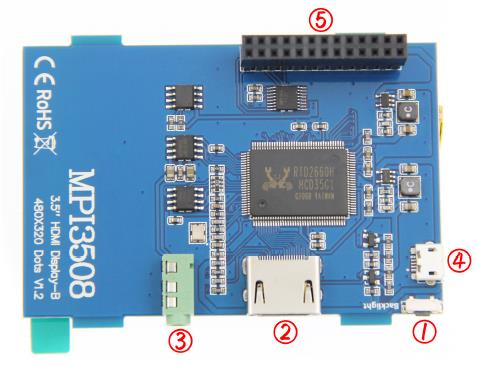
  • Backlight adjustment button: Short press changes brightness by 10%, long press (3 seconds) turns off backlight
  • HDMI interface: Connects motherboard to LCD monitor
  • Headphone jack: Standard 3.5mm audio output
  • Micro USB: Primary power supply input
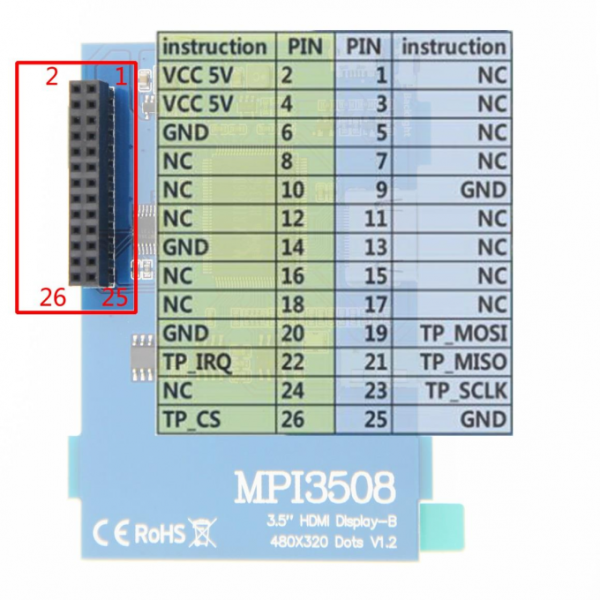
  • 13×2 Pin Socket: Provides 5V power from Raspberry Pi to LCD and transfers touch signals
3.5 Inch HDMI LCD Display 480x320 Resolution TFT Resistive Touch Screen3.5 Inch HDMI LCD Display 480x320 Resolution TFT Resistive Touch Screen
Raspberry Pi Connection Guide
  1. Connect the LCD's 13×2 pin socket to Raspberry Pi as shown:3.5 Inch HDMI LCD Display 480x320 Resolution TFT Resistive Touch Screen
  2. Connect the LCD and Raspberry Pi using the HDMI adapter:3.5 Inch HDMI LCD Display 480x320 Resolution TFT Resistive Touch Screen
Raspbian & Ubuntu Mate Setup
Step 1: Install OS Image
  1. Download official image from:
    • Raspberry Pi OS
    • Ubuntu Mate
  2. Format TF card using SDFormatter
  3. Burn image to TF card using Win32DiskImager
Step 2: Install Drivers
Method 1: Online Installation
  1. Connect to Raspberry Pi via SSH (Putty recommended)
  2. Execute these commands:
    sudo rm -rf LCD-show
    git clone https://github.com/goodtft/LCD-show.git
    chmod -R 755 LCD-show
    cd LCD-show/
    sudo ./MPI3508-show
  3. Wait for completion - LCD will be ready for use
Method 2: Offline Installation
  1. Download driver from: LCD-show.tar.gz
  2. Copy to Raspberry Pi root directory
  3. Execute these commands:
    cd /boot
    sudo tar zxvf LCD-show.tar.gz
    cd LCD-show/
    sudo ./MPI3508-show
  4. Wait for completion - LCD will be ready for use
PC Monitor Setup
  1. Connect computer HDMI output to LCD HDMI interface
  2. Connect LCD MicroUSB to computer's USB port for power
  3. For testing, set LCD as primary/only display
Note: Touch functionality is not available when used as a PC monitor.

Product Tags:

3.5 Inch HDMI LCD Display


HDMI LCD Display 480x320


480x320 TFT Resistive Touch Screen

      
China 3.5 Inch HDMI LCD Display 480x320 Resolution TFT Resistive Touch Screen wholesale

3.5 Inch HDMI LCD Display 480x320 Resolution TFT Resistive Touch Screen Images

Inquiry Cart 0
Send your message to this supplier
 
*From:
*To: Shenzhen Xinxiantong Technology Co., Ltd.
*Subject:
*Message:
Characters Remaining: (0/3000)
 
Inquiry Cart 0